
29 October 2026
Published on 2026-10-29
A site scan tells you which links on your store lead to a missing page. But it doesn’t tell you why the page is missing, and that’s usually the part that takes time to figure out. Maybe the product was deleted, maybe its URL handle changed, or maybe it’s still a draft.
Now you can ask Sidekick, Shopify’s AI assistant, to find out for you. Open a site scan in Link Manager and click Explain with Sidekick at the top of the page to ask about all the broken links in that scan. To ask about one link, click the Explain with Sidekick icon in its row.
Read More16 October 2026
Published on 2026-10-16
Link Manager sends you three kinds of email: the weekly summary, the alert when visitors hit more broken links than usual, and the results of a site scan. All three have a new design. Each one shows the main numbers first and then the broken links that need your attention most, and they’re easier to read on your phone.
Weekly summary. The visit count now covers only the last 7 days. Before, it added up every visit since each page first broke, so the number could look a lot higher than what actually happened that week. The top 5 pages are sorted by visits, and pages you moved to Ignored are left out. The links in the email also open the right page in Link Manager now. Before, some of them opened an empty page.
Read More15 October 2026
Published on 2026-10-15
Sidekick, Shopify’s AI assistant in the admin, can now work with Link Manager. You can ask about broken links, visitor 404s, site scans and redirects in plain language, and Sidekick answers from your Link Manager data without you opening the app.
Get a quick summary. Ask “how are my links doing?” and Sidekick tells you how many 404s your visitors hit this week compared to last week, how many broken paths still need a redirect, what your latest site scan found, and whether 404 tracking is turned on.
Read More15 October 2026
Published on 2026-10-15
Shopify is rolling out a new design for the admin, and most stores already have it. We updated Ablestar WooCommerce Importer and Link Manager to Shopify’s newest set of components, so both apps now look like the rest of your admin, with the same buttons, tables, and page layouts you see on Shopify’s own pages.
Your imports, redirects, and settings work the way they did before. Nothing in your data changed and you don’t need to set anything up.
Read More5 October 2026
Published on 2026-10-05
With all the AI crawlers visiting online stores, Shopify now limits automated visits a lot more than it used to. That protection can also catch the Link Manager site scan, so some scans stopped after a few pages and missed broken links.
You can now add a crawler access signature in Link Manager. It’s a key you create in your Shopify admin that tells Shopify you allowed Link Manager to scan your store. When it’s set up, your scans go straight to your store and reach your pages reliably. Without one, scans run the same way they did before.
Read More26 September 2026
Published on 2026-09-26
Shopify is removing script tags on March 1, 2027. Script tags were how Link Manager tracked broken link visits before Shopify added app embeds. Many stores are fine, but if you installed the app a while ago and never turned on the app embed, you’ll need to make an update before March 1 to keep broken link tracking working.
If your store needs the update, the Link Manager home page shows a banner that says Action needed before March 1, 2027. Click Customize your theme, turn on Manage Redirects, and click Save. When you go back to the app, it finishes the switch for you. Your broken link visits, redirects, and settings don’t change.
Read More10 February 2026
Published on 2026-02-10
We’ve added a new option on the Settings page to clear all broken link visits. This is useful after you’ve fixed broken links or added redirects and want to reset your analytics so they only reflect current issues.
Clearing broken link visits is permanent and cannot be undone.
26 January 2026
Published on 2026-01-26
We’ve updated both the Email Reports and WooCommerce Importer apps to use Shopify’s latest UI library, Shopify Web Components.
These apps were previously using a React-based Polaris component library. They’ve now been updated to use Shopify’s official Web Components, bringing them in line with Shopify’s current frontend standards and providing a more consistent experience inside the admin.
There should be no functional changes as part of this update however if you notice any UI issues or anything that doesn’t look quite right, please let us know and we’ll get it fixed.
Read More14 January 2026
Published on 2026-01-14
We’ve updated the Link Manager app to use Shopify’s latest UI library, Shopify Web Components.
Previously, the app UI was built using a React-based Polaris component library. We’ve now switched to Shopify’s official Web Components to better align with Shopify’s current frontend direction and ensure a more consistent experience within the admin.
There should be no changes to functionality, but if you notice any UI issues or unexpected behavior, please let us know and we’ll address it right away.
Read More23 December 2025
Published on 2025-12-23
Weekly reports from Link Manager now exclude visitor error events when a broken link is successfully handled by a wildcard redirect. This keeps 404 reporting focused on real, unresolved errors. You can still view 404 pages that were handled by wildcard redirects directly within the app if you need that detail.
13 November 2025
Published on 2025-11-13
We’ll be implementing a code freeze from November 20 to December 5, 2025. During this time, we’ll only deploy critical fixes to our Shopify apps.
This pause helps ensure stability and reliability during the peak holiday shopping period when many stores experience their highest traffic and order volumes of the year. It also gives our team more focus to monitor performance and support merchants through Black Friday and Cyber Monday.
Read More19 March 2025
Published on 2025-03-19
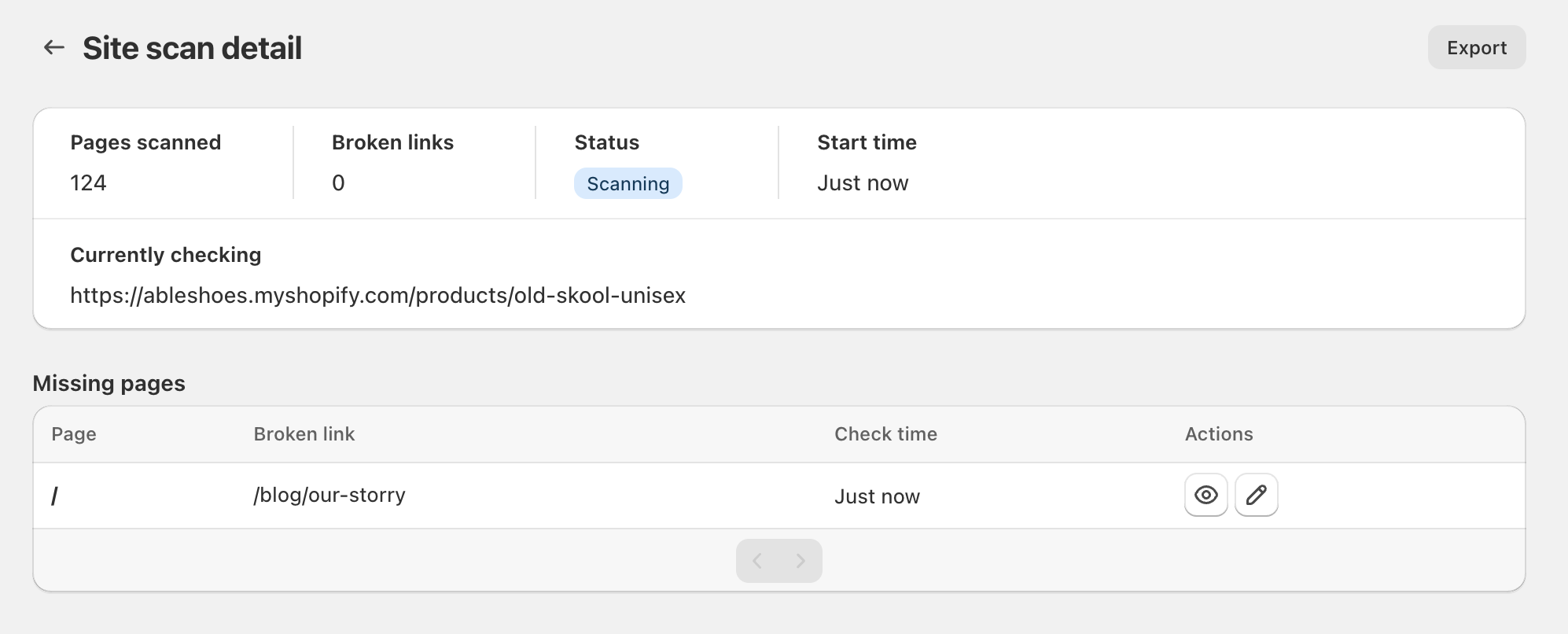
We’ve made improvements to the page that shows you the status of a site scan for broken links. Now, while the scan is running, you are able to see the current page being scanned and any broken links found so far. No more waiting for the scan to complete.
Learn more about scanning your Shopify store for broken links.
Published on 2025-03-06
On March 8, starting at 05:30 UTC, we will be performing database maintenance which will result in the Shopify apps being briefly unavailable. Scheduled tasks will run automatically once the maintenance completes but bulk edits running during that time may be interrupted and need to be restarted. We are trying our best to schedule the maintenance during periods of low usage, if you have any questions please reach out.
15 November 2024
Published on 2024-11-15
We are establishing a code freeze between November 25 and December 6. During this period we will only deploy critical fixes to our Shopify apps.
The idea behind a code freeze is to reduce the possibility of introducing bugs and unexpected system interactions that could cause problems during the peak holiday shopping days.
After December 6 we will resume deploying changes as usual.
1 October 2024
Published on 2024-10-01
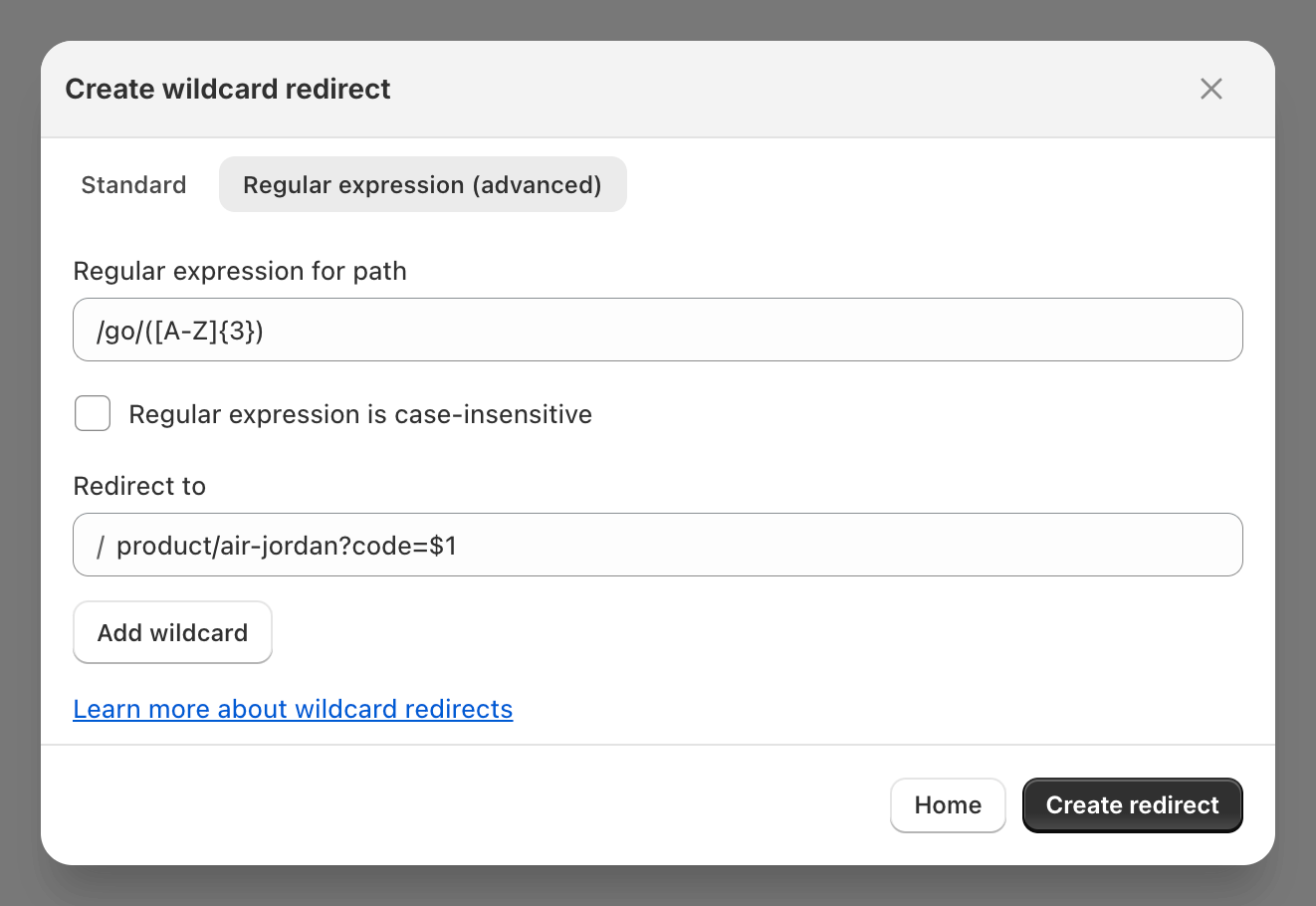
You can now use regular expressions when creating wildcard redirects using Ablestar Link Manager. Regular expressions (or regex) allow you to perform more advanced matching against URLs including looking for patterns or just certain groups of characters.
Learn more about 
26 July 2024
Published on 2024-07-26
Now wildcard redirects will preserve URL query parameters through the redirect. For example, if there’s a wildcard redirect setup for:
/p/* → /products/*
A visitor to the wildcard redirect would be redirected like so:
https://myshopify.com/p/summer-hat?promo_code=SUMMER2024 → https://myshopify.com/products/summer-hat?promo_code=SUMMER2024
Preserving the values in the URL that come after the question mark can help for user attribution or for promotions.
Learn more about wildcard redirects in Shopify.
5 June 2024
Published on 2024-06-05
When a vistor lands on a page with a wildcard redirect they’re seamlessly redirected to the new page. Now, you can see each time this happens in the app’s dashboard.
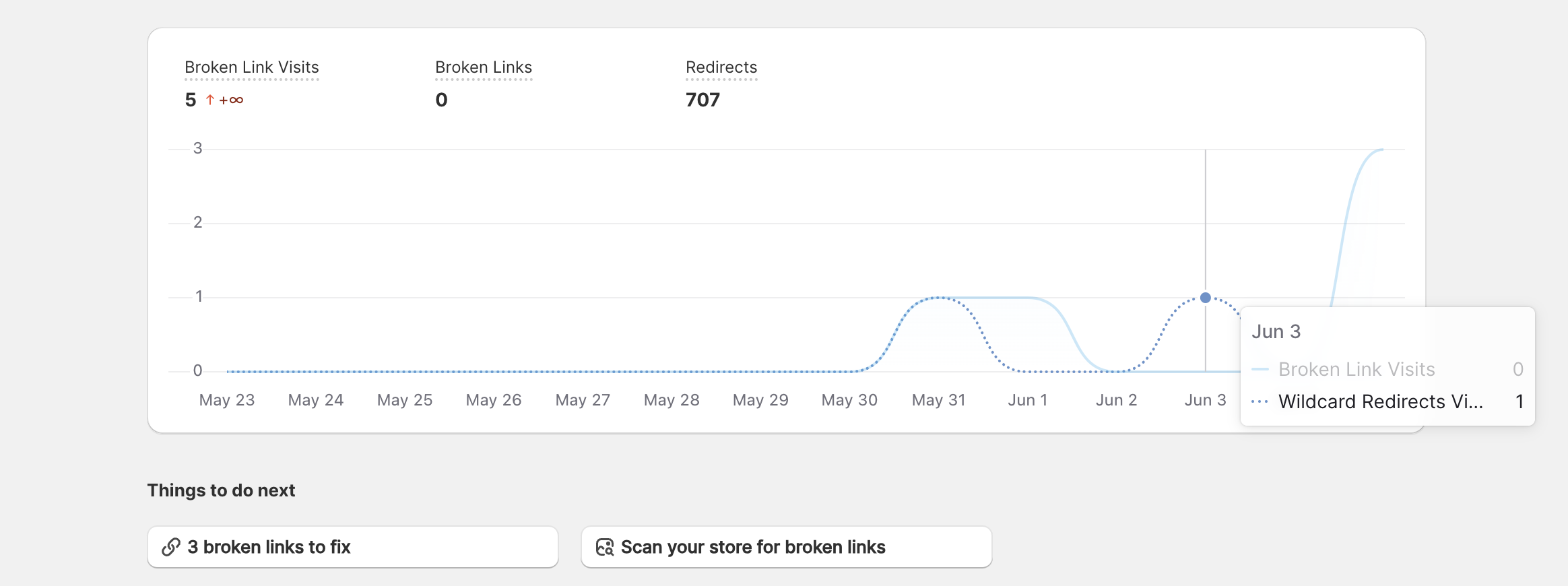
This data is also available when you export a spreadsheet of your wildcard redirect visits. This information can be especially useful if you’ve just migrated to Shopify because you can see the most frequent broken links, all the while ensuring your visitors get redirected to a relevant page.
Read More17 May 2024
Published on 2024-05-17
You can now use placeholders in wildcard redirects. This allows you to redirect a URL like /store/[ANY TEXT] to /products/[ANY TEXT]. This can be especially useful for migrations when the structure of your URLs are changing to Shopify’s format.
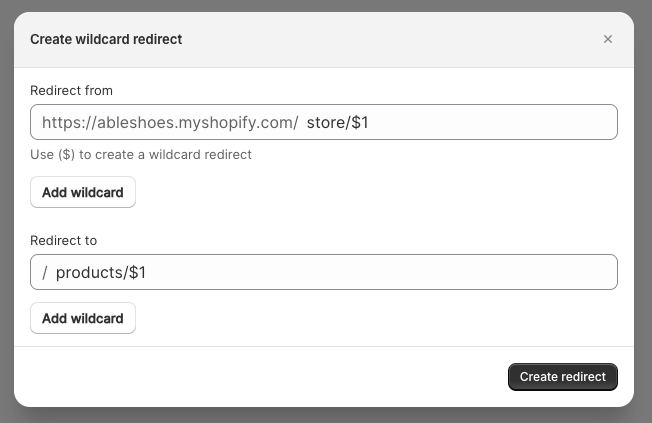
And as was the case before, wildcard redirects with Ablestar Link Manager do not a flicker of the ‘404 error page’ like other apps could.
Learn more about wildcard redirects on Shopify.
Read More23 April 2024
Published on 2024-04-23
Ablestar Link Manager now includes a weekly email report to track broken links on your store. The report will tell you the number of website visits to broken links as well as the number of internal broken links discovered in a site scan.
The reports are sent out Monday mornings.
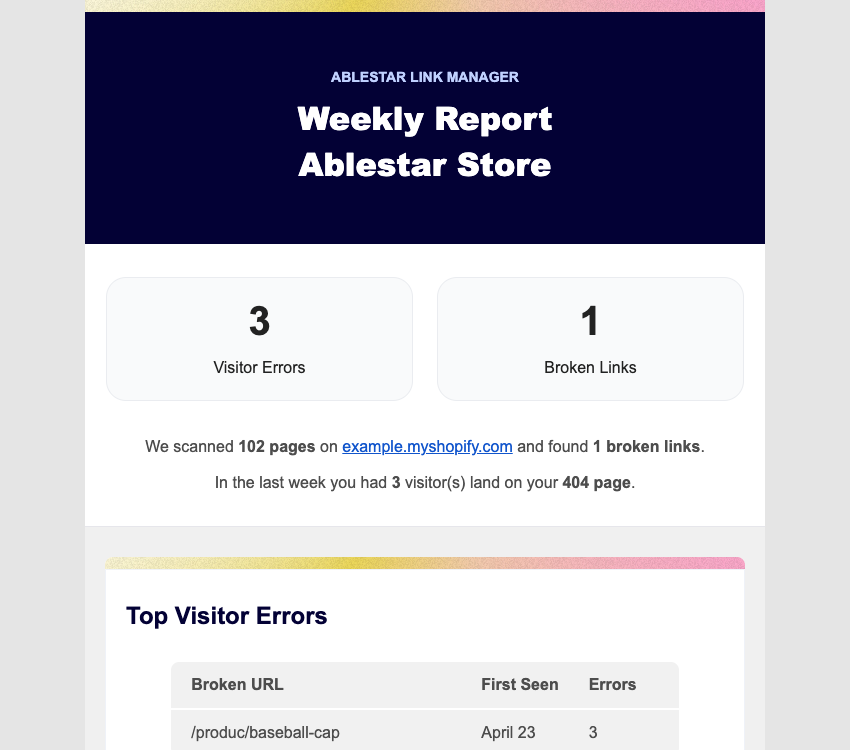
You can turn on the report and configure the recipients in the settings section of the app.
29 February 2024
Published on 2024-02-29
We’re very pleased to announce that now the Ablestar Link Manager is now ‘Built for Shopify’. According to Shopify, the “Built for Shopify status is the highest level of recognition and achievement that an app can reach” and requires the app to meet specific design and performance standards. With this milestone you can be sure that the app has very low impact on your store’s speed and will function well within the Shopify admin.
Read More