
7 June 2023
Published on 2023-06-07
You can now schedule spreadsheet edits from remote data sources using Inventory Sync. With this feature the app will download a spreadsheet from Google Drive, Dropbox, an FTP server, or a web URL, on a schedule and then use it to update your Shopify products.
You don’t need to reformat your spreadsheet into a strict format and, as with other edits done through the app, you can undo any changes if need to.
Read More15 May 2023
Published on 2023-05-15
The Bulk Product Editor app now offers enhanced file format support for seamless data management. In addition to Excel (.xlsx) and CSV (.csv) files, we’ve added compatibility for two more spreadsheet file types: semicolon-separated files and tab-separated files.
Previously, the app recognized CSV files with comma-separated fields as the standard format. However, we understand that some users prefer using semicolons or tabs as delimiters in their spreadsheets.
With this update, the Bulk Product Editor app intelligently detects the file format and automatically adjusts the import process accordingly. This update eliminates the need for manual configuration and ensures a smoother importing experience for all users.
Read More10 May 2023
Published on 2023-05-10
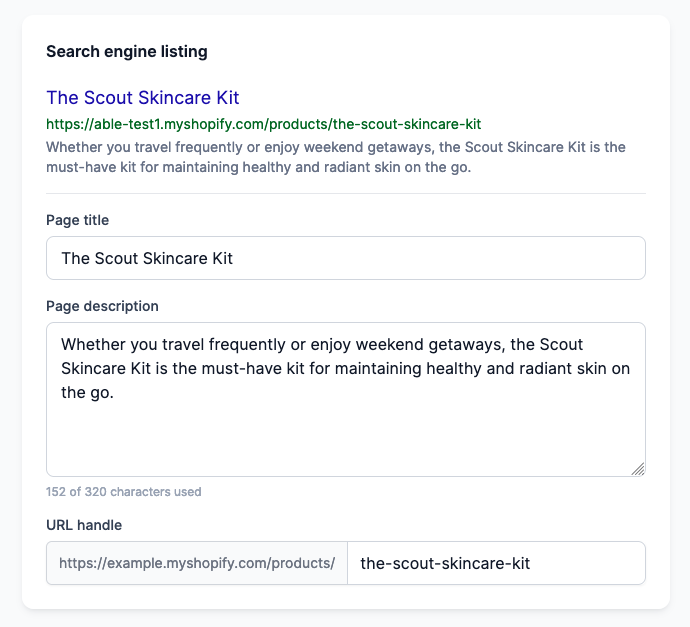
We’ve made it possible for you to edit SEO data directly from the product detail pages.
Before this update, the SEO data was read-only, but now you’ll be able to edit both the meta title and meta description HTML tags that show up in your pages. This will be a huge help when it comes to optimizing your pages for search engines and driving more traffic to your site.
8 May 2023
Published on 2023-05-08
We have released a new update for our Bulk Product Editor app. When you search for products, you can deselect products that you want to exclude from the search. Previously, if you went to another page besides the first page and deselected a product, you would be taken back to page one. With this update, you’ll stay on the current page after deselecting a product, making it easier to remove multiple products without losing your place in the pagination.
Read More25 April 2023
Published on 2023-04-25
We’re excited to announce a new update to the Bulk Product Editor that makes managing your product metafields even easier!
Previously, you could only change text metafields on product detail pages, but now you can add different types of metafields, including numeric metafields, true/false metafields, and list of strings metafields.
With these new metafield types, you’ll be able to add more detailed information to your products and manage them more effectively. We hope you find these updates helpful, and as always, we welcome your feedback.
Read More21 April 2023
Published on 2023-04-21
We are excited to announce another new feature in our Bulk Product Editor! We have added the ability to set the language for the AI product descriptions in the Selling section. With this update, you will have the option to select the language in which all outputs will be generated.
Please read our knowledge base article generating product descriptions with ChatGPT for more information.
20 April 2023
Published on 2023-04-20
We’re excited to announce a new update to our Bulk Product Editor app!
We’ve added images to the product detail pages to make it easier for you to keep track of which product you’re viewing. While the images are currently read-only, they can be helpful in quickly identifying the product you’re working on.
13 April 2023
Published on 2023-04-13
We are excited to announce a new feature on the product detail pages of our Bulk Product Editor app.
Now, you can easily navigate through your products with the addition of next/previous arrows. This feature allows you to move forward or backward through your products without having to return to the search page.
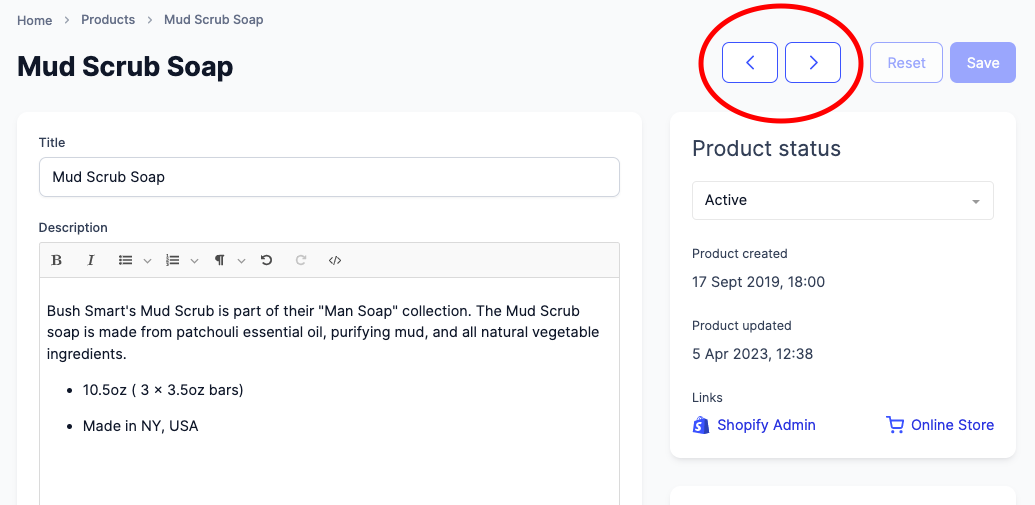
With this new functionality, you can streamline your product editing process and save time by quickly jumping from one product to another. Whether you’re making small tweaks or major updates to your products, the next/previous arrows make it easier to stay organized and focused.
Read More13 April 2023
Published on 2023-04-13
We’re excited to announce the release of the Ablestar Command Palette, a powerful tool designed to help you navigate our app with ease. With just a few keystrokes, you can quickly access any page, product, or setting you need.
The Command Palette also includes a search function that matches on partial product titles or exact SKU matches, making it even easier to find what you’re looking for.
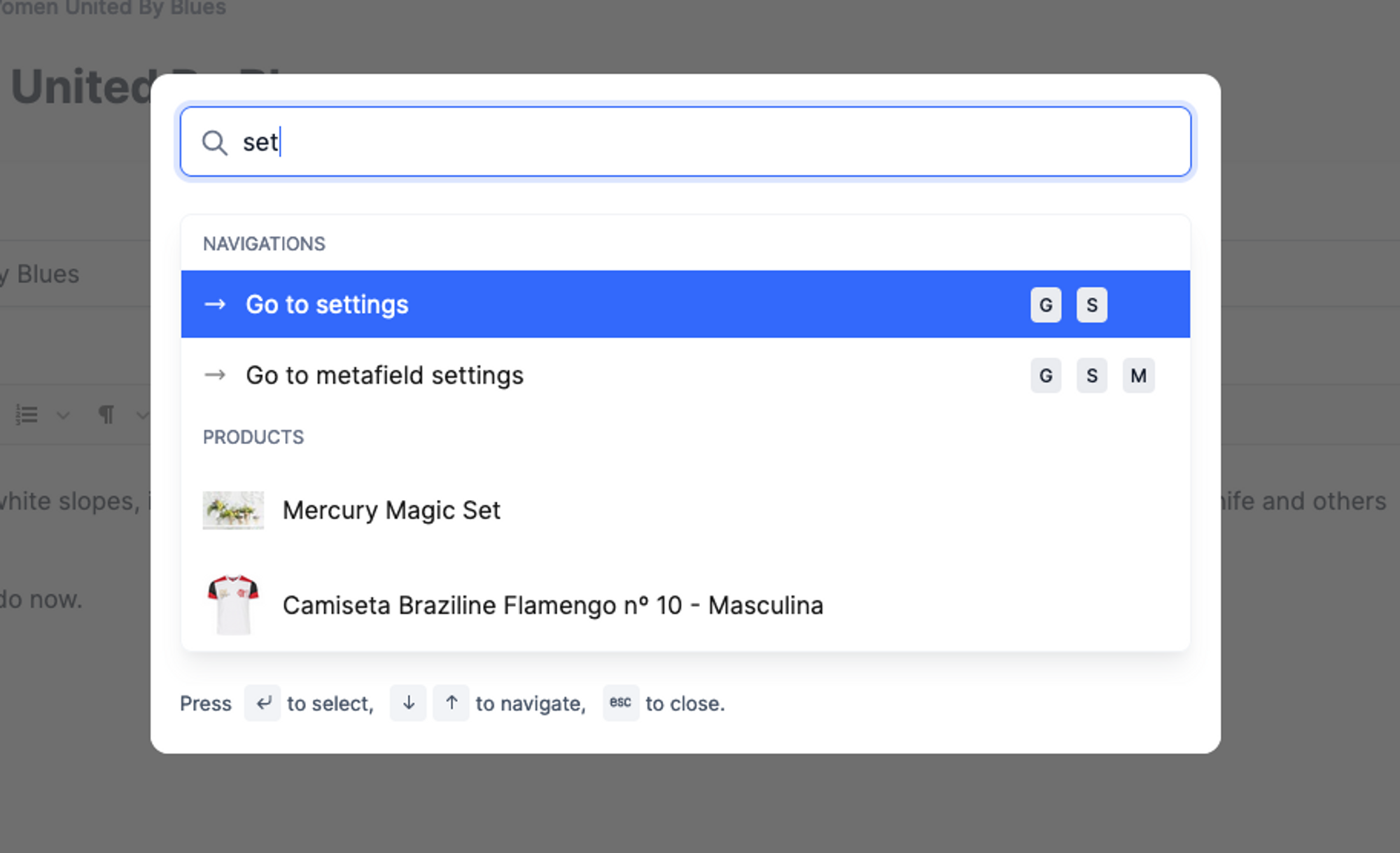
To get started with the Command Palette, simply press cmd + k on Mac or ctrl + k on Windows/Linux. We’ve also included a list of keyboard shortcuts that will help you work more efficiently in our app.
Read More12 April 2023
Published on 2023-04-12
Our Shopify bulk editor for products keeps an up-to-date copy of your product data in its database so you can run custom searches for products. Each time a product is updated in Shopify the app receives the change notification (a webhook message) from Shopify and updates its database.
Due to limitations of the Shopify API, changes to the some data sources cannot be synced with the Bulk Product Editor app in real-time. If you have made changes to these data sources outside of the Bulk Product Editor you’ll need to manually trigger a data refresh.
Read More4 April 2023
Published on 2023-04-04
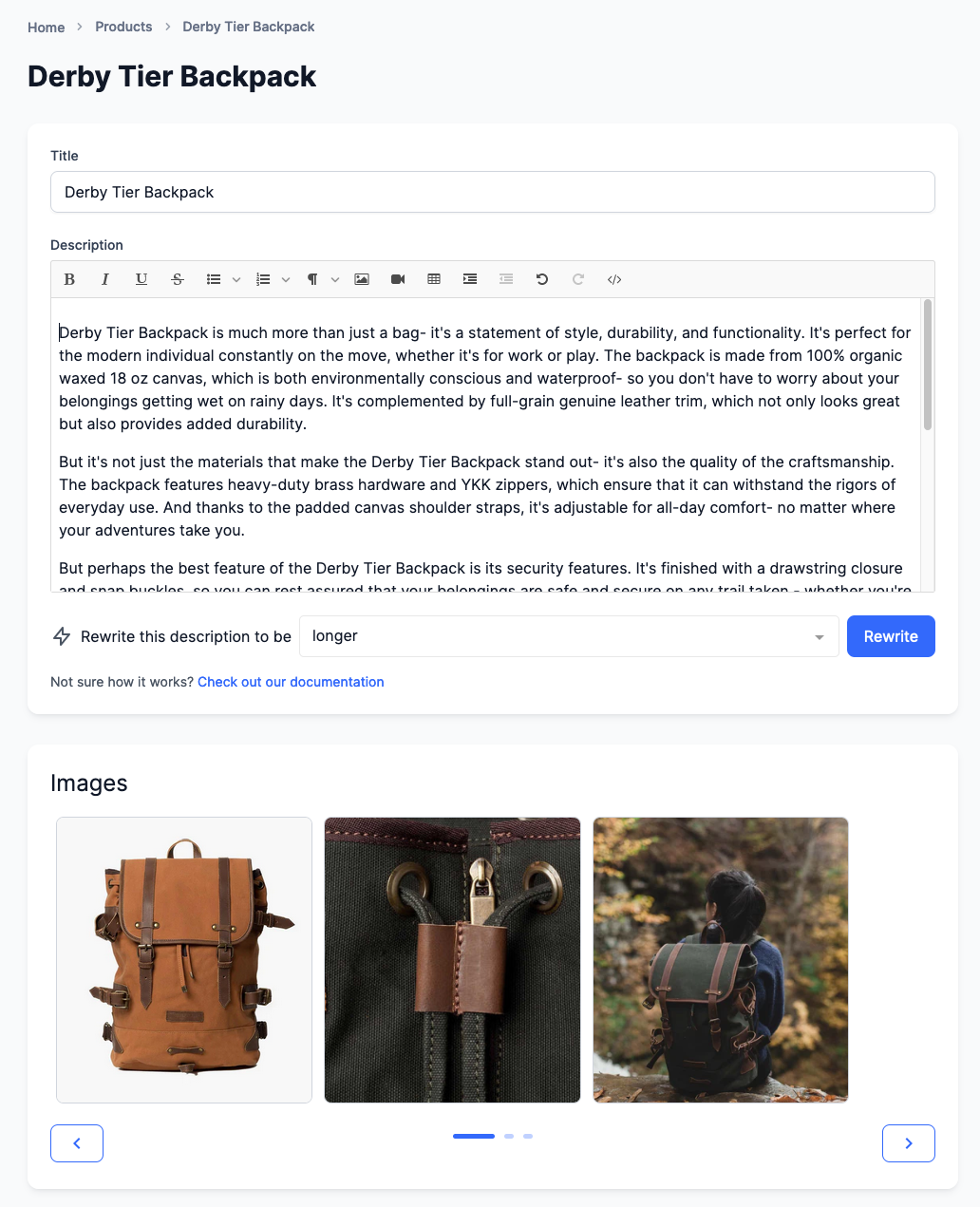
You can now generate, or rewrite, product descriptions automatically using artificial intelligence. Powered by ChatGPT, this feature allows you to efficiently create concise, engaging product descriptions, saving you time and effort.
To update your product descriptions, just open up the product in the app and click on the Rewrite button below the description:
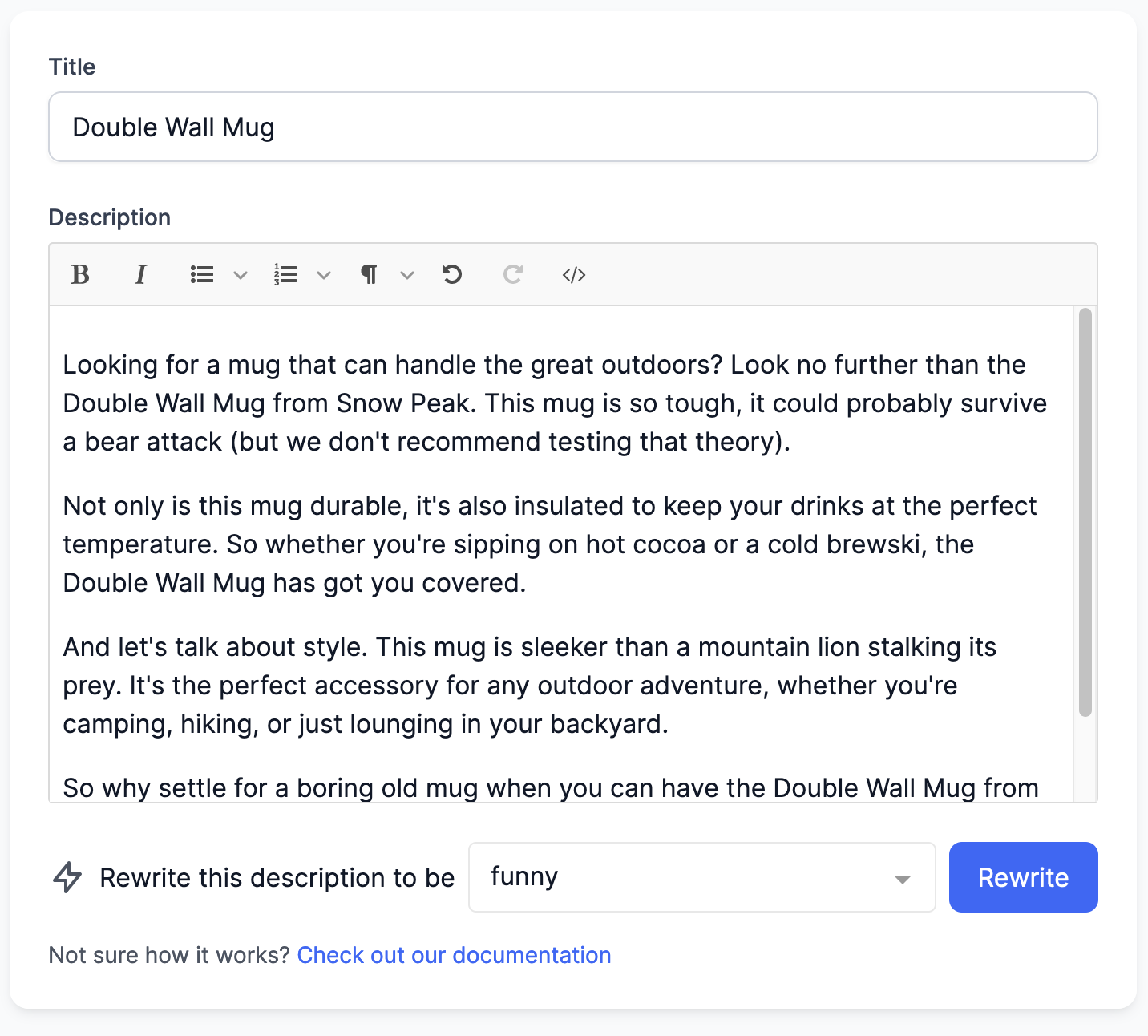
After a few seconds you’ll be presented with a fresh description that you can review and save. You can also rewrite the description multiple times to get the exact output you need.
Read More31 March 2023
Published on 2023-03-31
You can now connect product inventories to one or more locations with a spreadsheet edit. Previously you could connect inventories to different locations with an in-app edit but using a spreadsheet can make it faster if you have a lot of unique combinations of products and locations.
To connect inventory just upload a spreadsheet with an identifier and the location’s ID to the app and select ‘Connect Inventory to Location’ from the field drop down list:
Read More24 March 2023
Published on 2023-03-24
When filtering for the products you want to edit there can be cases where you want to manually exclude one or two products from the search results. For example, you might want to edit all products in a collection except for two products that are a special case.
Previously you could add an aditional filter to remove these products but it could be time consuming if there wasn’t any common, searchable, attribute between them.
Read More23 March 2023
Published on 2023-03-23
Previously, when you exported product data in CSV or Excel format the default file name would just be the name of the first column of the spreadsheet in lower case. For example, product_handle.csv. This naming convention could make it difficult to go back and find an downloaded export you were looking for.
We’ve updated the default file name for the exports so now they’re in the format of:
Product Handles 2023-03-23_090807.csv
21 March 2023
Published on 2023-03-21
You can now delete an arbitrary set of products directly with a spreadsheet edit. To do so just upload a spreadsheet with two columns, one to identify the products or variants and the other containing the text ‘delete’.
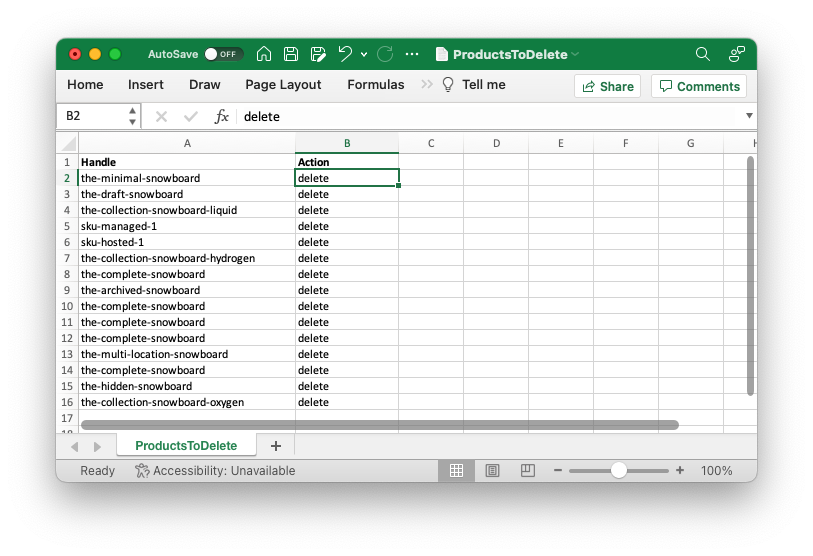
As with in-app edits to delete products, this action cannot be undone. In many cases is may be better to set the products to the ‘Archived’ state instead.
Learn more about bulk deleting products and variants in Shopify.
Read More16 March 2023
Published on 2023-03-16
We’ve made two changes to the page where you configure spreadsheet edits. The first is the addition of a Clear All button to reset all column mappings at once. When you upload a spreadsheet the app will try to guess which columns you want to edit but if you only want to edit one column this will save you from having to de-select each column.
The second change is that we’ve removed the column showing the number of matching products. We did this to save space and remove the need for excessive scrolling. Now, a warning will show up if a product matches more than one product or if it doesn’t match any products at all:
Read More14 March 2023
Published on 2023-03-14
You can now export the ‘Inventory Item ID’ field to a CSV or Excel spreadsheet. When you’re configuring your export, you’ll find the field under the ‘Variant Attributes’ list.
In the Shopify API, the Inventory Item ID field tracks a one-to-one relationship between product variants and ‘Inventory Items’. Inventory items store additional information about the variant and are also used for multi-location inventory.
13 March 2023
Published on 2023-03-13
You can now view and edit a product’s Google Shopping fields directly on the product detail pages. From the product search page click on the product you’re interested in. On the product’s detail page, the ‘Google Shopping’ tab allows you to see and edit the Google Shopping fields:
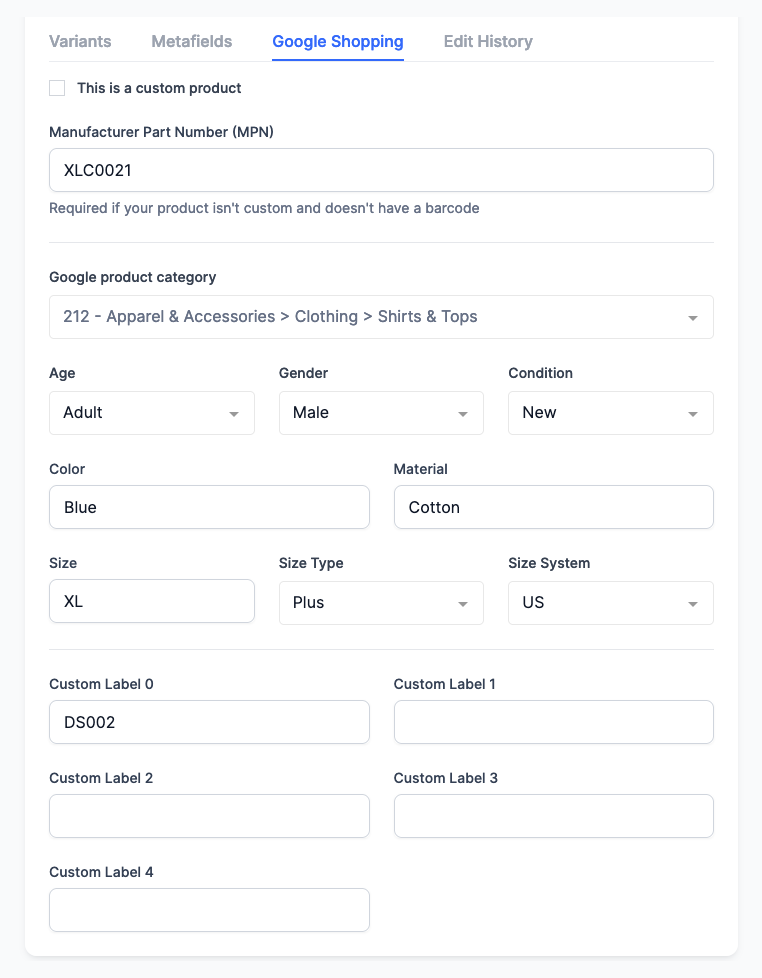
While the app is primarily used for bulk editing some times you may need to quickly check or edit a product. We’ve created these product detail pages within the app so you won’t have to wait for the Shopify admin to load in a new tab to view the products.
Read More13 March 2023
Published on 2023-03-13
We’ve added two options to in-app edits to make searching and replacing more powerful:
- You can now do a search and replace for individual elements within a metafield list of strings. This allows you to rename a single element in the metafield list regardless of its position.
- Searching and replacing text values now has the option to use a case-insensitive search. This makes it easier to standardize capitalization in your product titles or descriptions.
10 March 2023
Published on 2023-03-10
We’ve added the ability to save your product export configurations so you can retrieve them later. This way you won’t need to reselect all the fields you want to export if you’re switching between different export formats.
The export present will save your selection for all the fields you want to export as well as any delivery options to choose.
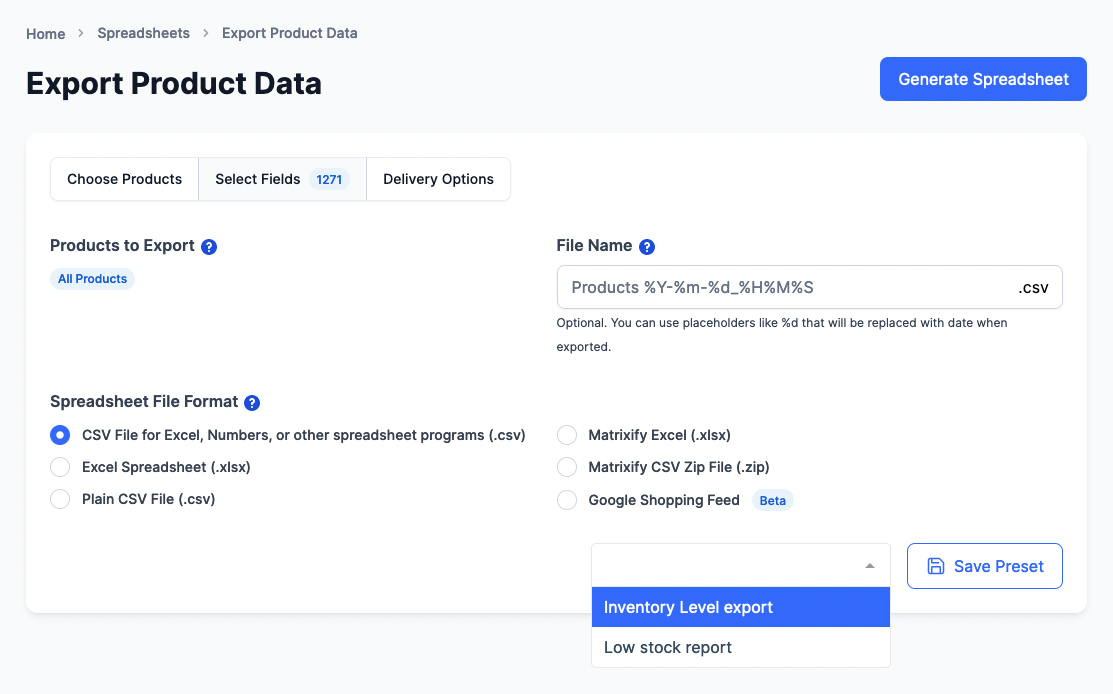
Learn more about saving product export configurations.
Read More